Sublustris Versio · the player’s guide
Manual
Sublustris Versio is a huge, warm reverb for the Noise Engineering Versio. It has three spaces, tails from a short room to minutes long, an endless setting that holds what you played, and a freeze you can play over and paint into. The plugin has the same panel and the same sound.
Terminology
- Tail
- The sound ringing on after you stop.
- Endless
- DECAY past about 3 o'clock: the tail never fades. It follows your playing, and holds when you stop.
- Freeze
- The tail held still as a pad, with the input closed, so you can play over it.
- Paint
- Holding the button while frozen, to blend a little of what you're playing into the pad.
- Onset
- How a sound enters the reverb: at once, swelling in, or with an octave on top.
- Wear
- The marks of old equipment on the reverb: tape, a bucket-brigade delay, bit grit.
Panel map
Sublustris runs behind your Versio’s printed panel, so the printed labels don’t match. Use this map to find each control. Knobs are counted in reading order, top to bottom, left to right.
| Panel location | Sublustris control |
|---|---|
| Top left knob | BLEND |
| Top right knob | DECAY |
| Centre knob, upper | TONE |
| Left knob, middle row | WEAR |
| Right knob, middle row | SIZE |
| Centre knob, lower | MOTION |
| Right knob, lowest | DEPTH |
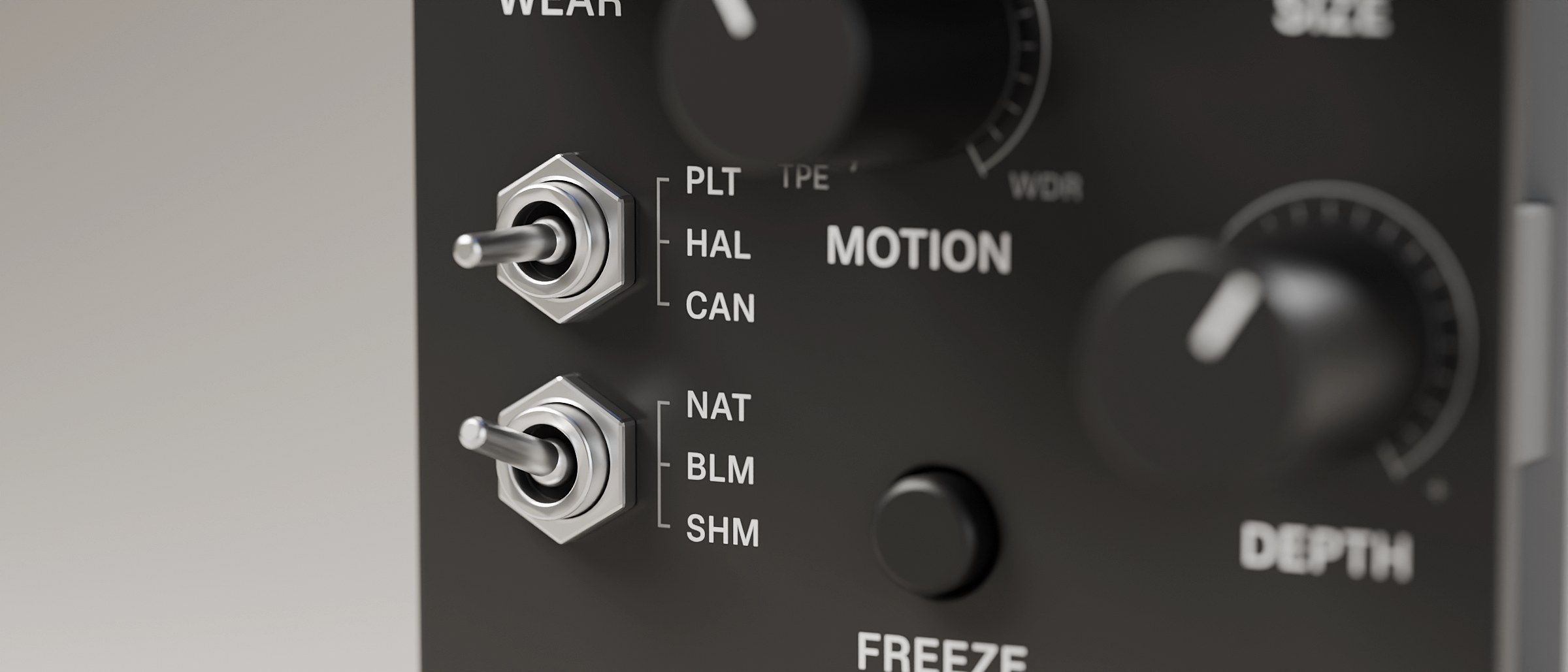
| Top switch | SPACE: PLATE · HALL · CANYON |
| Bottom switch | ONSET: NATURAL · BLOOM · SHIMMER |
| Button | FREEZE / PAINT |
| Four LEDs, left to right | Input L, input R, output L, output R |
| Jacks, top two rows | CV for each knob, in the order drawn (BLEND, TONE, DECAY, DEPTH; WEAR, MOTION, SIZE), and the FREEZE gate |
| Jacks, bottom row | In L, In R, Out L, Out R |
Controls
Clock positions are approximate. Fully left (7 o’clock) is the minimum, noon is the middle and fully right (5 o’clock) is the maximum.
BLEND
Dry ↔ wet, with no dip in the middle. Fully right is 100 % wet, for a send and return. Fully left is your dry signal, untouched: WEAR, MOTION and TONE only ever touch the reverb.
DECAY
How long the tail rings. Each space has its own range:
| SPACE | Fully left | Before endless |
|---|---|---|
| PLATE | about 0.4 s | about 30 s |
| HALL | about 0.8 s | about 60 s |
| CANYON | about 2 s | about 120 s |
The tail keeps the same loudness wherever you set it, so a short room isn’t quieter than a long hall.
Past about 3 o’clock the tail turns endless (fully from about 3:30). It never fades. While you play into it, it sounds like the longest tail just before 3 o’clock, at the same level, so turning DECAY across the line, quiet or hot, doesn’t jump. When you stop, the tail stops fading within about a second and holds where it is, and it never runs away. Play again and it picks straight back up.
When you stop playing for a couple of seconds, PLATE and HALL hold what you left them: over about ten seconds the tail’s movement settles, so held notes stay notes instead of smearing into haze. If what you played was bright, like a cymbal wash or noise, the top end also mellows slowly over a minute or two. Play again and the movement comes back. CANYON keeps its slow, moving wash.
Pull DECAY back and the endless tail turns into a normal one and fades.
In CANYON with ONSET on NATURAL, a longer DECAY also shortens CANYON’s built-in swell a little.
TONE
Darker or brighter, flat at noon. TONE works in two places at once: inside the reverb, so the tail gets darker (or brighter) with every pass, and on the reverb’s output.
- Left: the highs fade faster than the body, so the tail darkens as it rings. A warm, soft bump in the low mids rounds it out.
- Noon: flat.
- Right: the highs outlast the body, so the tail brightens as it rings, with a gentle sheen on top.
It’s never harsh and never rings on its own, even at the ends.
WEAR
How worn the reverb sounds. Fully left (the default) is clean, with only a warm, desk-like colour. As you turn it up, everything comes in at once and deepens together:
- tape saturation and a little tape compression;
- a bucket-brigade delay’s breathing: its noise and level rise and fall with your playing;
- bit grit, which stays the same share of a fading tail, so the tail stays grainy right to the end;
- a soft hiss and the odd crackle, which follow your playing, so silence stays silent.
WEAR doesn’t darken the tail (that’s TONE’s job) or move its pitch (that’s MOTION’s). The level stays about the same across the knob. Your dry signal is never worn.
SIZE
The size of the space.
- PLATE: a small plate to a large one.
- HALL: a small room to a huge hall. Small HALLs also have shorter tails.
- CANYON: a long wash to a boundless one, with a little more predelay as it grows.
A SIZE move doesn’t bend the pitch: once the knob comes to rest, the space crossfades to its new size over about a second. In PLATE, the smallest nudges glide instead (too slight to hear as a bend), and while frozen PLATE’s SIZE glides too.
While frozen, SIZE sets the size of the layer you play over the pad (see FREEZE / PAINT).
MOTION
Movement, both ways from noon: tape to the left, an old radio to the right.
- Noon: only a faint, steady movement, the one that keeps every tail from ringing metallic.
- Left: tape. The whole tail bends together, as one tape speed would, with a slow wow and a quicker flutter. It gets more uneven further left. From about 9:30 tape crinkle comes in, short bursts of jittery pitch over a scraping bed, and some of those bursts are dropouts, where the level dips and the highs dull for a moment. Further left the crinkle comes more often and the dropouts dip deeper: at fully left, half the bursts drop out. When you first turn into the left side, the tape comes up to speed over a few seconds.
- Right: radio. The tail plays through an old AM radio’s narrow band: its lows and its top roll away, its loudest peaks flatten a touch, and a slow notch wanders through the middle, so the tail phases. Just right of noon it’s a faint colour; further right, more of the tail goes through the radio, and the notch cuts deeper and moves quicker. The pitch doesn’t move on this side.
In HALL and CANYON the bass never bends in pitch; only what’s above it moves.
DEPTH
What DEPTH does depends on ONSET:
- NATURAL: predelay, from none to 250 ms. The gap between your sound and the reverb.
- BLOOM: swell time, from about 0.1 s to 4 s. How long the reverb takes to swell in. Shorter swells clash less with the next chord.
- SHIMMER: how much shimmer, from none to a strong octave.
SPACE (top switch)
- PLATE (left): a dense plate with a quick attack.
- HALL (centre): a big room. It starts right behind the note.
- CANYON (right): long lines and mass, like a space with no roof. The reverb swells in gently with each sound and grows into a boundless wash.
Switching crossfades: the old space’s tail fades out quickly while the new space takes the input.
ONSET (bottom switch)
How each sound enters the reverb, in every space.
- NATURAL (left): at once. DEPTH is predelay. CANYON keeps a gentle swell of its own.
- BLOOM (centre): the reverb swells in behind each sound over DEPTH’s time.
- SHIMMER (right): what you play, an octave up, goes into the reverb with it. It’s one octave, steady and in tune, and it doesn’t climb octave after octave. DEPTH sets how much.
FREEZE / PAINT button
- Tap to freeze. The tail stops changing and holds as a still pad. The freeze catches the moment you press, so you get the chord you’re holding. The output LEDs turn cool blue.
- Play over the freeze. While frozen, what you play goes into a second, quieter layer on top of the pad, about 8 dB under it, that rings and fades within about eight seconds. SIZE and DECAY shape it. In HALL and CANYON it’s a small room; in PLATE it’s a second plate.
- Hold to paint. While frozen, hold the button (longer than about a third of a second) and a little of that layer blends into the pad over about three seconds. Let go and the pad keeps it. The output LEDs pulse slowly while you paint. The pad stays itself: each paint adds only a little.
- Tap again to unfreeze. The pad fades out naturally, and the reverb glides back to where SIZE and DECAY are now.
SHIMMER rests while frozen, and comes back when you unfreeze.
Gate input (FREEZE)
The same gestures as the button. A short pulse toggles the freeze; a gate held high for longer than about a third of a second while frozen paints. The gate needs about 2 V. With nothing patched, it does nothing.
CV inputs
0–5 V, added to the knob’s position (turn the knob down to give CV room). Every knob has one.
Audio in and out
- In L / In R: true stereo in: left and right enter the reverb at different points. For mono, patch In L only and it feeds both sides.
- Out L / Out R: stereo out. A mono input still comes out wide.
LEDs
-
Left two: input level (In L, In R). Right two: output level (Out L, Out R).
-
Green → amber as the level gets hot, red on clipping.
- Input red: you’re near clipping at the jack. Turn the source down.
- Output red: the output limiter is catching peaks.
-
Cool blue under the output pair: frozen. It pulses slowly while you paint.
-
At power-up a short sweep across the four LEDs, cool blue to violet to white, says the firmware has loaded.
Quick start
- Patch a pad, a synth or a mix send into In L. Take Out L and Out R to your mixer.
- Set SPACE to HALL and ONSET to NATURAL. All the knobs to noon, except WEAR fully left and DEPTH at 9 o’clock.
- BLEND to about 2 o’clock, so you clearly hear the reverb. Bring it back once you’ve found the sound.
- DECAY: turn it up and listen to the tail grow. Past about 3 o’clock it becomes endless.
- Freeze: play a chord and tap the button. Play over the pad. Hold the button for a few seconds to paint, then tap to let it go.
- Then try SPACE on CANYON, ONSET on BLOOM with DEPTH at 1 o’clock, TONE left for a darker tail, WEAR up to 1 o’clock for tape and grit, and MOTION left for tape wow.
A few moves
- The endless pad. CANYON, DECAY fully up, BLEND at 3 o’clock. Play slow chords and let each one join the last.
- Freeze and play over it. HALL, DECAY at 2 o’clock. Tap a freeze on a chord, then play a melody over the pad. Hold the button through the best phrase to paint it in.
- Dub techno chords. HALL, DECAY just into endless, BLEND fully right on a return, or at 11 o’clock as an insert. The tail fills the gaps between the stabs and holds when they stop.
- Swell. BLOOM, DEPTH at 2 o’clock, on single piano notes or plucks. Each note swells in and hangs.
- Shimmer bed. SHIMMER, DEPTH at noon, DECAY at 3 o’clock, on a slow lead.
- Worn tape. WEAR at 2 o’clock, MOTION at 8 o’clock, TONE at 10 o’clock. An old tape of a big room.
- Slow change. Patch a slow LFO into SIZE in CANYON, or into MOTION, for a space that breathes.
In the plugin
The plugin (AU and VST3, macOS) has the same panel, sound and LEDs. A few things work differently to suit a DAW:
- FREEZE / PAINT is the panel button: click to freeze, hold the mouse to paint.
- MIDI notes into the plugin act as the gate. A held note is gate high, timed to the sample, so a MIDI clip can freeze, paint and unfreeze in time.
- ZOOM (1x, 1.5x, 2x) scales the panel.
- Use it on a return track with BLEND fully right, or as an insert with BLEND to taste.